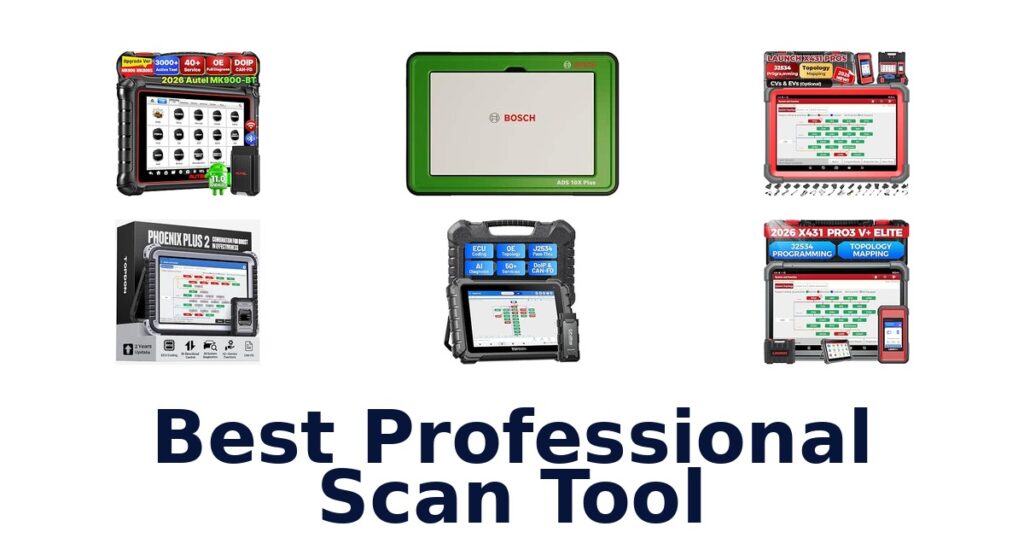

A strong professional scan tool combines broad system diagnostics with the advanced functions your shop actually uses, such as bidirectional controls, ECU coding, or J2534 programming. The Bosch ADS 10X Plus leads this selection with a wireless J2534-compliant VCI, DoIP and CAN FD support, and built-in ADAS calibration capability. Other contenders target specific needs: Launch and TOPDON models list coding or programming capabilities, while Autel options offer extensive service functions.
Screen sizes range from Innova’s 3.5-inch display to Bosch’s 11-inch screen, so portability and visibility also differ substantially. Treat compatibility as a vehicle-specific question, not a promise based on a tool’s brand or feature count.
Confirm your makes, model years, required functions, and subscription terms before choosing.
The Bosch ADS 10X Plus is the best professional scan tool in this group for shops seeking advanced diagnostics and a large, modern display. Its listed features include a wireless J2534-compliant VCI, DoIP and CAN FD support, built-in ADAS calibration capability, and an 11-inch 2.5K screen. Choose it when those capabilities match your workflow; for ECU coding across named vehicle brands, the TOPDON Phoenix Plus 2 is a strong alternative.
Our Top Picks
 Best Overall
Its wireless J2534-compliant VCI supports DoIP and CAN FD, while built-in ADAS calibration and an 11-inch 2.5K display suit advanced shop work.
View on Amazon Most Reset Functions
The listing identifies ECU coding, topology, and 60-plus resets, a broad combination for technicians needing network views and service functions.
View on Amazon Best for ECU Coding
It lists online ECU coding, offline programming for several makes, and a 10.1-inch screen, with stated coverage of 200-plus brands.
View on Amazon- Diesel Vehicle Support Launch X431 PRO3 V+ Elite
- Topology Mapping TOPDON ONE
Compare Professional Scan Tool Features
| # | Product | Screen Size | Weight | Dimensions | Buy |
|---|---|---|---|---|---|
| 1 | 1. Bosch ADS 10X PlusBest Overall | 11 in | 11.6 lb | — | View on Amazon |
| 2 | 2. Launch X431 PRO5Most Reset Functions | 10.1 in | — | — | View on Amazon |
| 3 | 3. TOPDON Phoenix Plus 2Best for ECU Coding | 10.1 in | 1555 g | 11"L x 2"W x 7"H | View on Amazon |
| 4 |  4. Launch X431 PRO3 V+ EliteDiesel Vehicle Support 4. Launch X431 PRO3 V+ EliteDiesel Vehicle Support | 10.1 in | — | 10.1"L x 1.5"W x 7.5"H | View on Amazon |
| 5 |  5. TOPDON ONETopology Mapping 5. TOPDON ONETopology Mapping | 10.1 in | 3.5 lb | 12.24"L x 8.15"W x 1.54"H | View on Amazon |
| 6 |  6. Autel MaxiCOM MK900BTBroad service and protocol coverage 6. Autel MaxiCOM MK900BTBroad service and protocol coverage | 8 in | 600 g | — | View on Amazon |
| 7 |  7. THINKCAR THINKSCAN 689BT PROTopology-focused professional diagnostics 7. THINKCAR THINKSCAN 689BT PROTopology-focused professional diagnostics | 8 in | — | — | View on Amazon |
| 8 |  8. MUCAR 892BTAI-assisted tablet diagnostics 8. MUCAR 892BTAI-assisted tablet diagnostics | 8 in | — | — | View on Amazon |
| 9 |  9. Autel MaxiCOM MK808SMulti-brand service and active tests 9. Autel MaxiCOM MK808SMulti-brand service and active tests | 7 in | 0.5 kg | 9.45"L x 1.38"W x 5.91"H | View on Amazon |
| 10 |  10. Innova 5610Hands-on OBD2 repair workflow 10. Innova 5610Hands-on OBD2 repair workflow | 3.5 in | 1.3 lb | 7"L x 3.75"W x 1"H | View on Amazon |
Detailed Reviews: Best Professional Scan Tool
#1 · Best Overall
1. Bosch ADS 10X Plus
- Screen Size: 11 in
- Weight: 11.6 lb
Best for: Advanced wireless shop diagnostics.
Why it ranks #1: Its wireless J2534-compliant VCI supports DoIP and CAN FD, while built-in ADAS calibration and an 11-inch 2.5K display suit advanced shop work.
An 11-inch 2.5K display and wireless J2534-compliant GVCI give the Bosch ADS 10X Plus a substantial, cable-light diagnostic setup. Its stated support for DoIP and CAN FD without adapter cables addresses newer communication protocols, while three CAN channels can transmit, monitor, and receive data simultaneously.
The high-resolution display, 8GB RAM, and octa-core processor are specified alongside scan speeds up to 24 times faster, supporting a responsive, information-rich workspace. Wireless GVCI connectivity handles DoIP and CAN FD without adapter cables, and simultaneous data handling across three CAN channels suits network-focused diagnostics. The package also includes a docking station. Full ADAS calibration capability and J2534 compliance are listed; optional wiring-diagram access and ADAS software options may affect which functions fit a shop’s workflow.
- 11-inch 2.5K display, 8GB RAM, and octa-core processor.
- Wireless J2534-compliant GVCI supports DoIP and CAN FD without adapter cables.
- Handles data across three CAN channels simultaneously.
- Full ADAS calibration capability is listed.
- Wiring-diagram access is optional rather than included as a stated standard feature.
Skip it if you require wiring diagrams included as standard; the listing describes wiring-diagram access as optional.
The Bosch ADS 10X Plus fits advanced shops seeking wireless protocol support, a large high-resolution screen, and ADAS calibration. Consider the optional status of wiring-diagram access when planning the functions your technicians need.
Full product details
| Brand | Bosch |
|---|---|
| Included Components | Scan Tool, Docking Station |
| Item Weight | 11.6 pounds |
| Manufacturer | Bosch |
| Part Number | ADS10X Plus |
| Manufacturer Warranty Description | Per Contract with Amazon |
| Model Number | ADS10X Plus |
| Screen Size | 11 inches |
Listed on Amazon as: Bosch ADS 10X Plus Professional Diagnostic Scan Tool with Wireless VCI
View on Amazon#2 · Most Reset Functions
2. Launch X431 PRO5
- Screen Size: 10.1 in
Best for: ECU coding and reset-heavy workflows.
Why it ranks #2: The listing identifies ECU coding, topology, and 60-plus resets, a broad combination for technicians needing network views and service functions.
ECU coding, topology, and more than 60 resets headline the LAUNCH X431 PRO5’s stated capabilities. Those features make it relevant to technicians handling configuration, network-oriented diagnosis, and maintenance procedures from one scan tool. Its 10.1-inch screen and included VCI connector support the listed diagnostic hardware setup.
ECU coding and topology mapping address two different diagnostic needs: module configuration and network visualization. The title’s 60-plus reset figure points to a broad service-oriented workflow, though the supplied details do not enumerate the individual resets or their vehicle coverage. A 10.1-inch display offers a larger viewing area than compact readers, and the package lists an OBD II extension cable, VCI connector, and power adapters. Verify that the specific coding and reset functions cover the vehicles you work on.
- ECU coding is listed.
- Topology mapping is listed.
- More than 60 reset functions are stated.
- 10.1-inch screen with VCI connector and OBD II extension cable.
- The supplied details do not name the individual reset functions or specify their vehicle coverage.
Skip it if you need a verified, vehicle-specific list of reset functions before choosing; the supplied details give a total but not the individual procedures.
The PRO5 is aimed at technicians whose work combines ECU coding, topology, and numerous reset procedures. Its listed capabilities are broad, but the missing reset-by-reset coverage details matter when matching it to a specific fleet.
Full product details
| Brand | LAUNCH |
|---|---|
| Included Components | Launch X431 PRO5 obd2 diagnostic scan tool * 1, OBD II extension cable *1, Password envelope *1, Power adaptor *2, VCI connector *1 |
| Manufacturer | LAUNCH |
| Part Number | LAUNCH X431 PRO 5 Car Scanner |
| Manufacturer Warranty Description | 2 Year Manufacturer |
| Model Number | LAUNCH X431 PRO 5 Car Scanner |
| Screen Size | 10.1 inches |
Listed on Amazon as: Launch X431 Scanner PRO5 J2534 Pr0gram ECU Coding, Topology, 60+ Reset 2026
View on Amazon#3 · Best for ECU Coding
3. TOPDON Phoenix Plus 2
- Screen Size: 10.1 in
- Weight: 1555 g
- Dimensions: 11"L x 2"W x 7"H
Best for: ECU coding and programming work.
Why it ranks #3: It lists online ECU coding, offline programming for several makes, and a 10.1-inch screen, with stated coverage of 200-plus brands.
Online ECU coding and offline programming give the TOPDON Phoenix Plus 2 a clear role in module-level repair work. Its listed functions include module replacement and initialization through PMI, plus full-system adaptations. The 10.1-inch display and supplied diagnostic and programming leads support a more involved workshop setup.
Online coding provides access to manufacturer-level configurations for listed makes including Benz, BMW, GM, Ford, Porsche, and Toyota, while offline programming is specified for Ford, Mazda, Vauxhall, and Opel. That distinction helps buyers match the tool to the vehicles and operations they handle. PMI module replacement and initialization, along with full-system adaptations, extend its role beyond code reading. TOPDON lists coverage of 200-plus brands and 50,000-plus models, with two years of free updates.
- Online ECU coding and offline programming are supported.
- PMI supports module replacement and initialization.
- Full-system adaptations are listed.
- 10.1-inch screen and two years of free updates.
- Offline programming is specifically listed for Ford, Mazda, Vauxhall, and Opel.
Skip it if you need offline programming for a make outside Ford, Mazda, Vauxhall, or Opel; those are the makes specified for that function.
Pick the Phoenix Plus 2 for workshop jobs involving ECU coding, module initialization, and adaptations across its stated coverage. Check the make-specific offline-programming list if that capability is central to your workflow.
Full product details
| Brand | TOPDON |
|---|---|
| Included Components | Battery Clamps/Cable Set, MDCI Dongle, Multi-Brand Diagnostic & Programming Lines, OBDI Adapter BOX Transfer Line, OBDII Extension Cable, Phoenix Plus 2, Power Adaptor, Type-C to USB Cable, User Manual |
| Dimensions | 11"L x 2"W x 7"H |
| Item Weight | 1555 g |
| Manufacturer | TT TOPDON |
| Part Number | TOPDON Phoenix Plus |
| Manufacturer Warranty Description | 2 Years Free Update & 1 Year Warranty |
| Model Number | Phoenix Plus |
| Screen Size | 10.1 inches |
Listed on Amazon as: TOPDON Phoenix Plus 2 Scan Tool with ECU Coding, Bidirectional Control
View on Amazon#4 · Diesel Vehicle Support
4. Launch X431 PRO3 V+ Elite
- Screen Size: 10.1 in
- Dimensions: 10.1"L x 1.5"W x 7.5"H
Best for: Mixed gasoline and diesel service.
Why it ranks #4: Its SmartLink C and J2534 protocol support stand out, and the listing specifies support for most gasoline and diesel vehicles made after 1996.
Support for most gasoline and diesel vehicles manufactured after 1996 gives the LAUNCH X431 PRO3 V+ ELITE a broad stated vehicle-age and fuel-type scope. Its 10.1-inch tablet works with the included SmartLink C V2.0, and the package includes multiple connection cables for a workshop diagnostic setup.
The stated support for most post-1996 gasoline and diesel vehicles makes this a candidate for technicians working across those vehicle types, though the listing recommends checking compatibility by brand, model, and year. A 10.1-inch display provides a larger viewing surface, while the SmartLink C V2.0 and supplied HD15-to-OBDII and other cables form the listed connection kit. Two years of free updates are specified. The supplied facts do not detail particular service functions or protocol coverage.
- Supports most gasoline and diesel vehicles manufactured after 1996.
- 10.1-inch screen.
- Includes SmartLink C V2.0.
- Two years of free updates are listed.
- Vehicle support is stated for most, not all, post-1996 gasoline and diesel vehicles.
Skip it if you need guaranteed support across every vehicle in a mixed fleet; the listing limits its claim to most post-1996 gasoline and diesel vehicles.
The PRO3 V+ ELITE suits technicians who service both gasoline and diesel vehicles from 1996 onward and want a large tablet with SmartLink hardware. Verify compatibility for specific vehicles before relying on a particular function.
Full product details
| Brand | LAUNCH |
|---|---|
| Included Components | HD15F to OBDII 16 Connector, DB15F to HD15F Cable, UK/EU/US Plug, Network Cable, Type A -Type B USB Cable, Type A -Type C USB Cable, User Manual, PIN envelope, Quick Start Guide, X431 PRO3 V+ ELITE Display Tablet, SmartLink C V2.0 |
| Dimensions | 10.1"L x 1.5"W x 7.5"H |
| Manufacturer | LAUNCH |
| Part Number | X431 PRO3 V+ ELITE |
| Manufacturer Warranty Description | 2-Year F-ree Update |
| Model Number | X431 PRO3 V+ ELITE |
| Screen Size | 10.1 inches |
Listed on Amazon as: Launch X431 PRO3 V+ Elite SmartlinkC Bidirectional Scan Tool J2534 Protocol
View on Amazon#5 · Topology Mapping
5. TOPDON ONE
- Screen Size: 10.1 in
- Weight: 3.5 lb
- Dimensions: 12.24"L x 8.15"W x 1.54"H
Best for: Live vehicle-network visibility.
Why it ranks #5: Its 10.1-inch tablet and OE-level topology mapping focus on visualizing ECU network communication for network diagnosis.
Real-time topology mapping is the TOPDON ONE’s clearest differentiator, displaying vehicle ECU network communications as they happen. That view can help technicians orient network diagnostics around the vehicle’s electronic modules. The 10.1-inch tablet, VCI, and OBDII extension cable form the included hardware setup for connecting and viewing diagnostic information.
TOPDON describes the topology map as visualizing the vehicle’s ECU network and showing real-time communication, making it relevant when technicians need a network-level view rather than only individual codes. Its 10.1-inch screen provides a larger workspace for that visual information. The package includes a ONE VCI and OBDII extension cable, along with USB cables and a power adapter, so the listed components cover connection and charging needs. The supplied facts do not enumerate service functions or vehicle coverage.
- Topology mapping visualizes the ECU network.
- Displays real-time communication data.
- 10.1-inch screen.
- Includes a VCI and OBDII extension cable.
- The supplied details do not enumerate service functions or vehicle coverage.
Skip it if you need a specified list of service functions or supported vehicle coverage before selecting a professional scan tool.
The TOPDON ONE is a fit for technicians who value a large display and real-time ECU network mapping. Its supplied product facts do not state coverage or service-function breadth, so weigh those requirements separately.
Full product details
| Brand | TOPDON |
|---|---|
| Included Components | OBDII Extension Cable; USB Cable (USB-C to USB-C); USB Cable (USB-A to USB-C), ONE Tablet, ONE VCI, Power Adapter, Quick User Guide; Packing List |
| Dimensions | 12.24"L x 8.15"W x 1.54"H |
| Item Weight | 3.5 pounds |
| Manufacturer | TOPDON |
| Part Number | TDONE |
| Manufacturer Warranty Description | 1 Year Warranty |
| Model Number | TOPDON ONE |
| Screen Size | 10.1 inches |
Listed on Amazon as: TOPDON ONE Bidirectional Scan Tool, 10.1" Professional Diagnostic Tool
View on Amazon#6
6. Autel MaxiCOM MK900BT
- Screen Size: 8 in
- Weight: 600 g
Best for: Broad service and protocol coverage.
Why it ranks #6: It lists 40-plus service functions, including 28-plus normal and 12-plus special resets, alongside CAN-FD and DoIP support.
More than 40 service functions, including 28 normal and 12 special resets, give the Autel MaxiCOM MK900BT a broad maintenance focus. CAN-FD and DoIP support add newer communication protocols, while its 8-inch, 1280-by-800 display provides space to navigate diagnostics and service tasks on the vehicle.
The listed 40-plus services cover both normal functions and special resets, making this a fit for shops handling varied maintenance procedures as well as diagnostics. CAN-FD and DoIP support address vehicles using those protocols, and the 8-inch 1280-by-800 screen offers a larger, sharper workspace than the smaller Autel models named in the supplied comparison. Android 11.0 hardware is also specified. One year of free software updates is included; most features remain active after the subscription expires.
- 40-plus service functions, including 28 normal and 12 special resets.
- Supports CAN-FD and DoIP.
- 8-inch, 1280-by-800 screen.
- Includes one year of free software updates.
- Free software updates are limited to one year.
Skip it if you need software updates beyond the included first year; the supplied facts do not promise later updates at no charge.
The MK900BT suits technicians who need numerous service functions, CAN-FD and DoIP support, and a large display. Confirm vehicle-function compatibility for your intended applications, since the listing says functions are not universal across all vehicles.
Full product details
| Brand | Autel |
|---|---|
| Included Components | MK900BT Main Unit, MaxiVCI V150, Power Adapter, USB Type-C Cable, Soft Cloth, Quick Reference Guide, Packing List, Carrying Case |
| Item Weight | 600 g |
| Manufacturer | Autel |
| Part Number | Newest MaxiCOM MK900BT |
| Manufacturer Warranty Description | 1 Year |
| Model Number | Newest MaxiCOM MK900BT |
| Screen Size | 8 inches |
| Additional Information | Important information Safety Information Functions are not universal compatible with all vehicles. Please send VIN to us check compatibility before purchase. Autel MaxiCOM MK900BT has updated to newest software and hardware. |
Listed on Amazon as: Autel Scanner MaxiCOM MK900BT Bidirectional Tool, 40+ Service, CAN-FD& DOIP
View on Amazon#7
7. THINKCAR THINKSCAN 689BT PRO
- Screen Size: 8 in
Best for: Topology-focused professional diagnostics.
Why it ranks #7: This bidirectional tool includes a J2534 VCI and an 8-inch screen, but the supplied details provide fewer specific professional functions.
Topology mapping is the THINKSCAN 689BT PRO’s defining feature, giving technicians a network-oriented way to approach vehicle diagnostics. Its 8-inch screen provides room to view information, while the included J2534 VCI connects the tool to its diagnostic workflow. Online technical support and step-by-step guidance are also offered for getting started.
The combination of topology mapping and a J2534 VCI makes this a candidate for buyers who want network-focused diagnostics rather than a basic code reader. The 8-inch display gives the interface more viewing area than a compact handheld, and the carrying bag helps keep the scanner and included accessories together between jobs. THINKCAR also lists online technical consultation and guides for select functions, which can help new users navigate supported operations. The supplied details do not specify vehicle coverage or enumerate service functions.
- Topology mapping is identified as a core feature.
- Includes a J2534 VCI.
- 8-inch screen.
- Online technical support and guides for select functions are offered.
- The supplied product details do not specify vehicle coverage or list supported service functions.
Skip it if you need a stated vehicle-coverage list or a detailed catalog of service functions before choosing a scanner.
Choose this THINKCAR if topology mapping, an included J2534 VCI, and an 8-inch display suit your diagnostic workflow. Its supplied information leaves vehicle coverage and specific service functions unspecified, so check those against your intended work.
Full product details
| Brand | thinkcar |
|---|---|
| Included Components | 1* 3-in-1 Charger (US/UK/EU Plugs), 1* Carrying Bag, 1* User Manual, 1* J2534 VCI, 1* THINKSCAN 689BT PRO, 1* Type-C Charging Cable |
| Manufacturer | THINKCAR |
| Part Number | THINKSCAN 689BTPRO |
| Manufacturer Warranty Description | 1 Year Warranty |
| Model Number | THINKSCAN 689BT PRO |
| Screen Size | 8 inches |
Listed on Amazon as: THINKCAR THINKSCAN 689BT PRO Bidirectional Scan Tool with Topology Map
View on Amazon#8
8. MUCAR 892BT
- Screen Size: 8 in
Best for: AI-assisted tablet diagnostics.
Why it ranks #8: It combines bidirectional diagnostics with an 8-inch Android 10 display, 4GB RAM, and 64GB storage; detailed professional capabilities are less specified.
AI-assisted diagnostics distinguish the MUCAR 892BT, while its 8-inch screen and Android 10 platform provide the listed interface and operating system. The hardware specification includes a four-core processor, 4GB RAM, and 64GB storage, giving buyers concrete information about its computing setup for diagnostic work.
The AI-assisted diagnostic feature is the central workflow claim, paired with an 8-inch display that offers more viewing area than a compact code reader. Android 10, a four-core processor, 4GB RAM, and 64GB storage specify the tool’s platform and hardware, which can help buyers assess its fit for their work environment. The title also identifies full-system scanning, bidirectional operation, and free lifetime updates. The supplied details do not list vehicle coverage or enumerate service functions.
- AI-assisted diagnostic feature is listed.
- Full-system scanning is stated in the title.
- Bidirectional operation is stated in the title.
- 8-inch screen with Android 10, 4GB RAM, and 64GB storage.
- The supplied details do not specify vehicle coverage or enumerate service functions.
Skip it if you need a detailed vehicle-coverage or service-function list before purchase; those specifics are not supplied here.
Consider the MUCAR 892BT if AI-assisted diagnostics, bidirectional operation, and an 8-inch Android tablet suit your workflow. Its stated hardware is clear, but vehicle coverage and individual service functions remain unspecified.
Full product details
| Brand | mucar |
|---|---|
| Manufacturer | MUCAR |
| Part Number | OBD2 SCANNER US |
| Model Number | OBD2 SCANNER US |
| Screen Size | 8 inches |
Listed on Amazon as: MUCAR 892BT Full System AI Bidirectional Scan Tool, Free Lifetime Updates
View on Amazon#9
9. Autel MaxiCOM MK808S
- Screen Size: 7 in
- Weight: 0.5 kg
- Dimensions: 9.45"L x 1.38"W x 5.91"H
Best for: Multi-brand service and active tests.
Why it ranks #9: The 7-inch tool lists 28-plus services and 3,000-plus active tests, though the supplied specifications do not identify J2534 or ECU coding.
The MaxiCOM MK808S lists more than 28 service functions and over 3,000 active tests, putting maintenance routines and component checks at the center of its appeal. Its title also specifies all-system diagnosis and coverage across 200-plus brands, while the 7-inch screen keeps the tablet relatively compact.
More than 28 services and 3,000-plus active tests provide a broad set of listed procedures for technicians who need to command vehicle systems during diagnosis. All-system diagnosis and stated coverage across 200-plus brands point to a multi-make role, although the supplied facts do not verify compatibility for every vehicle or function. The 7-inch screen and 0.5-kilogram listed weight make it a smaller, lighter tablet option than larger-screen tools. Confirm that specific functions match the vehicles you service.
- More than 28 service functions are listed.
- Over 3,000 active tests are specified.
- All-system diagnosis is listed.
- 7-inch screen and 0.5-kilogram listed weight.
- The 7-inch screen provides less display area than 8- or 10.1-inch alternatives.
Skip it if you prioritize a larger viewing surface for shop diagnostics; this Autel has a 7-inch screen.
The MK808S suits technicians seeking multi-brand system diagnosis, service procedures, and active tests in a lighter 7-inch tablet. Check function-level compatibility for your vehicles, since broad brand coverage does not establish universal support.
Full product details
| Brand | Autel |
|---|---|
| Included Components | MK808S |
| Dimensions | 9.45"L x 1.38"W x 5.91"H |
| Item Weight | 0.5 kg |
| Manufacturer | Autel |
| Part Number | Newest Autel MaxiCOM MK808S |
| Manufacturer Warranty Description | 1 year warranty for quality problem |
| Model Number | Newest Autel MaxiCOM MK808S |
| Screen Size | 7 inches |
#10
10. Innova 5610
- Screen Size: 3.5 in
- Weight: 1.3 lb
- Dimensions: 7"L x 3.75"W x 1"H
Best for: Hands-on OBD2 repair workflow.
Why it ranks #10: It offers bidirectional functions, live data, and several resets, but its 3.5-inch screen and more limited listed capabilities suit simpler work better.
Bidirectional controls paired with OBD2 and OEM live data make the Innova 5610 useful for hands-on troubleshooting and repair tasks. Its listed functions include reading and clearing ABS and SRS codes, plus oil-light resets and battery-system checks. The compact 3.5-inch reader comes with an OBD2 cable and protective boot.
Live data and code severity information can help users interpret problems while diagnosing, while the ability to read and erase ABS and SRS codes extends the tool beyond check-engine work. Oil-light resets, oil-life information, battery-system checks, and drive-cycle procedures support routine maintenance and follow-up tasks. At 7 by 3.75 by 1 inches, the reader is compact, and its soft pouch supports storage. The smaller 3.5-inch display is a practical trade-off for buyers who prefer a handheld form.
- Bidirectional scan tool with OBD2 and OEM live data.
- Reads and erases ABS and SRS codes.
- Includes oil-light reset and battery-system check functions.
- Compact reader includes a protective boot and storage pouch.
- The 3.5-inch screen offers less viewing area than tablet-style scan tools.
Skip it if you need a large tablet display for extended diagnostic sessions; this reader has a 3.5-inch screen.
Choose the Innova 5610 for OBD2 troubleshooting, live data, and listed maintenance functions in a compact handheld. Its 3.5-inch screen is the key fit consideration for technicians who prefer a larger display.
Full product details
| Brand | Innova |
|---|---|
| Included Components | Code Reader with Protective Boot, Manual, OBD2 Cable, Soft Pouch for Storage, USB Cable |
| Dimensions | 7"L x 3.75"W x 1"H |
| Item Weight | 1.3 pounds |
| Manufacturer | Innova Electronics Corporation |
| Part Number | 5610 |
| Model Number | 5610 |
| Screen Size | 3.5 inches |
| Additional Information | Important Information Proposition 65 Warning for California Consumers WARNING: This product can expose you to chemicals including diisononyl phthalate (DINP) which is known to the State of California to cause cancer. For more information go to www.P65Warnings.ca.gov |
Listed on Amazon as: Innova 5610 OBD2 Bidirectional Scan Tool – Understand Your Vehicle, Pinpoint What's Wrong, and Complete Your Repairs with Less Headache, Updates Included, US-Based Technical Support
View on AmazonAvoiding compatibility and programming surprises
A feature label does not establish that a scan tool will perform that function on every vehicle, so verify the exact vehicle before relying on it. Autel explicitly warns that functions are not universally compatible and advises checking compatibility by VIN. This matters especially for coding, module replacement, initialization, and programming: TOPDON Phoenix Plus 2 lists coding and programming for specified makes and routes, while Launch X431 PRO3 V+ Elite describes support for most gasoline and diesel vehicles made after 1996.
Those descriptions are not interchangeable guarantees for every model or operation. Ask the seller or manufacturer to confirm the vehicle year, make, model, and intended function, and establish whether a subscription or online connection is needed.
Also distinguish a tool’s protocols from its practical coverage: Bosch lists DoIP and CAN FD support, but those protocol names alone do not confirm support for a specific repair task.
How to Choose a Professional Scan Tool
Advanced protocols and programming
Look for the exact protocol or programming capability your workflow requires, rather than treating every professional label as equivalent. Bosch ADS 10X Plus lists a wireless J2534-compliant VCI with DoIP and CAN FD support, while Launch X431 PRO3 V+ Elite also lists J2534 protocol support. TOPDON Phoenix Plus 2 specifies online ECU coding and offline programming for Ford, Mazda, Vauxhall, and Opel; TOPDON ONE instead highlights topology mapping.
For shops doing advanced network or programming work, prioritize the relevant named capability and confirm vehicle coverage. For general diagnostics and service work without coding requirements, a tool with documented active tests or reset functions may be the more relevant fit.
Screen size and workspace
Choose a display size that fits how and where you diagnose vehicles. This lineup ranges from the Innova 5610’s 3.5-inch screen through 7-inch and 8-inch models to 10.1-inch tablets and the Bosch ADS 10X Plus at 11 inches. Bosch additionally lists a 2.5K display, and Autel MK900BT lists an 8-inch, 1280-by-800 screen.
A larger tablet can give more room for viewing live data or diagrams, but may be less convenient to carry around a vehicle; the supplied information does not provide comparable weights for every model. Favor the larger end for bench-side or shop-bay viewing, and a smaller handheld format when compactness matters more.
Service functions and diagnostic breadth
Match the tool’s listed service functions and tests to the repairs you perform most often. Autel MaxiCOM MK900BT specifies 40-plus service functions, split into 28-plus normal and 12-plus special resets; MaxiCOM MK808S lists 28-plus services and 3,000-plus active tests. Launch X431 PRO5 advertises 60-plus resets, while Innova 5610 lists functions such as ABS and SRS code reading, oil resets, live data, and battery checks.
These counts and examples describe different capabilities, so do not assume that a higher count includes a particular procedure you need. Choose a broad service menu for a varied repair workload, or prioritize named functions when your shop repeatedly handles specific systems.
Which professional scan tool fits your shop?
For a shop needing advanced network protocols, J2534, and ADAS capability, choose Bosch ADS 10X Plus. If ECU coding and programming across named makes are central, TOPDON Phoenix Plus 2 is the more directly specified match; choose Launch X431 PRO5 when its listed topology and 60-plus resets fit your workflow. For diesel coverage and J2534, consider Launch X431 PRO3 V+ Elite.
TOPDON ONE is a focused option for topology mapping, while Autel MaxiCOM MK900BT emphasizes 40-plus service functions and CAN-FD and DoIP. For a smaller screen with many listed active tests, Autel MaxiCOM MK808S is worth considering.
Innova 5610 is better suited to simpler, handheld diagnostics than broad professional programming. Verify exact vehicle compatibility and subscription requirements before purchase.
Related Buying Guides
Frequently Asked Questions
How can I confirm a scan tool supports my exact vehicle and model year?
Check the tool maker’s vehicle coverage information for your exact make, model, model year, and the systems you need to diagnose. Confirm support for specific functions, such as bidirectional tests or coding, separately from basic code reading. If coverage is unclear, ask the seller or manufacturer to verify compatibility before purchase.
Do scan tool subscriptions affect diagnostic functions after updates expire?
It depends on the tool and its subscription terms. Before buying, confirm which functions remain available when updates expire, whether coverage for newer vehicles requires an active subscription, and whether any online services have separate requirements. Do not assume that update access and existing diagnostic functions follow the same expiration rules.
What should I check before using ECU coding or programming functions?
Confirm exact vehicle and module compatibility, the procedure’s requirements, and whether an active subscription or online connection is needed. Follow the manufacturer’s instructions and maintain stable vehicle power during the procedure. Coding or programming can change module configuration, so use it only when you understand the intended result and can recover from an interruption.
When is topology mapping useful in a professional shop?
Topology mapping can help visualize vehicle systems and their network relationships, which may support a more organized diagnostic workflow. Check whether the tool offers mapping for the vehicles you service and whether the feature covers the modules you need. A topology feature alone does not confirm compatibility with every vehicle or diagnostic function.
Should I prioritize bidirectional tests or service functions?
Prioritize the functions that match your shop’s work. Bidirectional tests let a technician command supported components, while service functions cover specified maintenance operations. Compare the exact vehicle coverage and function lists rather than relying on broad feature counts, since availability can vary by vehicle and system.
Final Words
For advanced diagnostics, network protocols, J2534, and ADAS capability, the Bosch ADS 10X Plus is the strongest fit in this group, especially if its large display suits your workflow. Choose the TOPDON Phoenix Plus 2 when ECU coding across named makes is central; consider the Launch options for their specified coverage and functions. Match any shortlist to your vehicles, verify compatibility, and check subscription terms before purchase.