
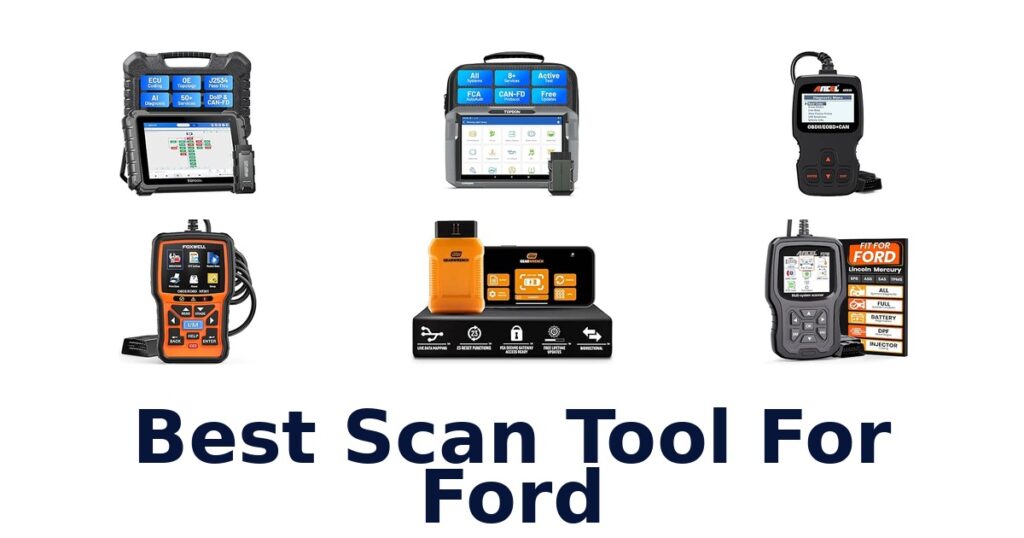

A strong scan tool for Ford should match the systems you need to diagnose, whether that means FORScan access to Ford networks or broader checks beyond engine codes. The OBDLink EX FORScan OBD Adapter suits Windows users who want fast, Ford-protocol-aware access through FORScan, while the ANCEL FD700 is a dedicated Ford, Lincoln, and Mercury handheld scanner with functions spanning several vehicle systems. Other options in this roundup range from USB adapters to general-purpose bidirectional tools and basic engine-code readers.
That distinction matters: an OBD-II code reader may help with a check-engine light but does not necessarily read ABS, transmission, or other modules. Compare vehicle coverage, connection style, and diagnostic scope before choosing, and verify compatibility for your specific vehicle and intended functions.
The OBDLink EX FORScan OBD Adapter is the best scan tool for Ford in this selection because it is designed for FORScan on Windows and supports Ford protocols, modules, and advanced software features. It switches between HS-CAN, MS-CAN, and J1850 networks, with an electronic switch for access to CAN buses. Choose it if you want a computer-based FORScan setup.
For a standalone Ford-focused handheld scanner, the ANCEL FD700 is a strong alternative with full-system functions listed for Ford, Lincoln, and Mercury.
Our Top Picks
 Best Overall
Designed for FORScan on Windows, supports Ford protocols and modules, and switches between HS-CAN, MS-CAN, and J1850 networks.
View on Amazon Best Ford Handheld
Ford, Lincoln, and Mercury-focused full-system scanner with listed ABS, SRS, SAS, BMS, oil reset, TPMS, and other functions.
View on Amazon Best USB Alternative
Ford MS-CAN and HS-CAN USB adapter for FORScan, with ELM327 compatibility and a stated connection speed up to 500 kbit/s.
View on Amazon- Best Bidirectional GEARWRENCH GWSMARTBT
- Broadest Service Menu Autel MaxiCOM MK900BT
Compare Ford Scan Tools by Use and Capability
| # | Product | Dimensions | Screen Size | Weight | Buy |
|---|---|---|---|---|---|
| 1 | 1. OBDLink EX AdapterBest Overall | 3.5"L x 1"W x 1.8"H | — | — | View on Amazon |
| 2 | 2. ANCEL FD700Best Ford Handheld | — | 2.8 in | 1.3 lb | View on Amazon |
| 3 | 3. OHP FORScan USB ToolBest USB Alternative | 8.43"L x 5.87"W x 1.65"H | — | — | View on Amazon |
| 4 |  4. GEARWRENCH GWSMARTBTBest Bidirectional 4. GEARWRENCH GWSMARTBTBest Bidirectional | — | — | 0.11 kg | View on Amazon |
| 5 |  5. Autel MaxiCOM MK900BTBroadest Service Menu 5. Autel MaxiCOM MK900BTBroadest Service Menu | — | 8 in | 600 g | View on Amazon |
| 6 |  6. TOPDON AD900 LiteWireless touchscreen diagnostics 6. TOPDON AD900 LiteWireless touchscreen diagnostics | 11.53"L x 5.39"W x 8.58"H | 8 in | 4.8 lb | View on Amazon |
| 7 |  7. TOPDON ONETopology-mapping diagnostic tablet 7. TOPDON ONETopology-mapping diagnostic tablet | 12.24"L x 8.15"W x 1.54"H | 10.1 in | 3.5 lb | View on Amazon |
| 8 |  8. FOXWELL NT604 EliteMulti-system diagnostic coverage 8. FOXWELL NT604 EliteMulti-system diagnostic coverage | 7.68"L x 3.54"W x 1.18"H | 4.3 in | — | View on Amazon |
| 9 |  9. FOXWELL NT301Check-engine live-data reader 9. FOXWELL NT301Check-engine live-data reader | 8.66"L x 3.15"W x 6.69"H | 2.8 in | 0.16 kg | View on Amazon |
| 10 | 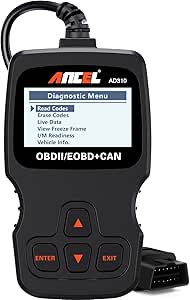 10. ANCEL AD310Basic OBD-II engine checks 10. ANCEL AD310Basic OBD-II engine checks | 8.9"L x 6.9"W x 1.4"H | 2.4 in | — | View on Amazon |
Detailed Reviews: Best Scan Tool For Ford
#1 · Best Overall
1. OBDLink EX Adapter
- Dimensions: 3.5"L x 1"W x 1.8"H
Best for: FORScan Windows adapter.
Why it ranks #1: Designed for FORScan on Windows, supports Ford protocols and modules, and switches between HS-CAN, MS-CAN, and J1850 networks.
Electronic switching between HS-CAN, MS-CAN, and J1850 Ford networks lets FORScan reach multiple vehicle buses without a manual toggle. OBDLink EX is recommended by the FORScan team and supports Ford protocols, modules, and advanced software features, making it a focused choice for owners using FORScan on Windows rather than a general-purpose handheld reader.
The electronic switch moves between Ford network types and lets FORScan access all CAN buses simultaneously, avoiding the manual handling required by toggle-switch adapters. OBDLink lists throughput up to 20 times faster than those adapters, which can help when working through diagnostics in FORScan. Its support for Ford protocols, modules, and advanced features makes it suited to deeper software-based work; the trade-off is that this adapter is centered on a Windows FORScan workflow, not a screen-equipped standalone scanner.
- Electronic switching between HS-CAN, MS-CAN, and J1850 Ford networks
- Access to all CAN buses simultaneously through FORScan
- Supports Ford protocols, modules, and advanced FORScan features
- Up to 20 times faster throughput than toggle-switch adapters
- Its FORScan workflow is centered on Windows rather than a standalone handheld reader.
Skip it if you want listed Ford service functions such as battery registration or ABS and SRS work; the ANCEL FD700 names those capabilities.
For Ford owners using FORScan on Windows, this adapter’s network switching and module access support a software-led diagnostic workflow. Choose another kind of scanner if you want an integrated screen or listed reset functions without relying on FORScan.
Full product details
| Brand | OBDLink |
|---|---|
| Included Components | Quick Start Guide, Scanner |
| Dimensions | 3.5"L x 1"W x 1.8"H |
| Manufacturer | OBD Solutions |
| Part Number | 429101 |
| Model Number | EX101 |
Listed on Amazon as: OBDLink EX FORScan OBD Adapter
View on Amazon#2 · Best Ford Handheld
2. ANCEL FD700
- Screen Size: 2.8 in
- Weight: 1.3 lb
Best for: Ford system service functions.
Why it ranks #2: Ford, Lincoln, and Mercury-focused full-system scanner with listed ABS, SRS, SAS, BMS, oil reset, TPMS, and other functions.
Battery registration alongside ABS, SRS, SAS, BMS, oil reset, TPMS, engine, IQA, EPB, and regen functions gives the ANCEL FD700 a broad Ford, Lincoln, and Mercury service focus. That named coverage lets owners look beyond basic engine codes, although the supplied details do not identify individual vehicle-year compatibility.
The FD700’s listed service functions span battery registration, ABS, SRS, steering-angle calibration, battery management, oil reset, TPMS, EPB, and regen, offering more named maintenance tasks than a basic engine-code reader. The inclusion of engine and IQA functions adds diagnostic relevance for Ford-family vehicles. Its Ford, Lincoln, and Mercury positioning makes the intended audience clear, but the supplied information does not provide specific model-year coverage, so buyers should treat the feature list as the stated scope rather than a universal fit guarantee.
- Ford, Lincoln, and Mercury-focused scanner
- Includes battery registration and BMS functions
- Lists ABS, SRS, SAS, and TPMS capabilities
- Includes oil reset, EPB, and regen functions
- Specific compatible vehicle years are not given in the supplied details.
Skip it if you only need basic check-engine code reading; the ANCEL AD310 is explicitly a basic OBD-II engine code reader.
The FD700 suits Ford-family owners who want a named set of service functions beyond engine codes, including battery registration and ABS or SRS coverage. Its stated brand scope is useful, but the supplied details do not establish model-year fit.
Full product details
| Brand | ANCEL |
|---|---|
| Item Weight | 1.3 pounds |
| Manufacturer | ANCEL |
| Part Number | FD700 |
| Model Number | FD700 |
| Screen Size | 2.8 inches |
| Additional Information | Important information |
Listed on Amazon as: ANCEL FD700 Ford Lincoln Mercury OBD2 Scanner, Full System Automotive Car Code Reader with All Functions, Including Battery Registration ABS SRS SAS BMS Oil Reset TPMS Engine IQA EPB Regen
View on Amazon#3 · Best USB Alternative
3. OHP FORScan USB Tool
- Dimensions: 8.43"L x 5.87"W x 1.65"H
Best for: USB FORScan DIY diagnostics.
Why it ranks #3: Ford MS-CAN and HS-CAN USB adapter for FORScan, with ELM327 compatibility and a stated connection speed up to 500 kbit/s.
The OHP adapter connects through USB and supports Ford MS-CAN and HS-CAN, giving FORScan users a route to read, interpret, and clear diagnostic trouble codes. Its ELM327 compatibility and listed bus-speed range make it a specific option for DIY diagnostics on Ford cars and trucks, rather than a screen-based handheld scanner.
OHP’s USB connection pairs with its stated ELM327 compatibility and support for Ford MS-CAN and HS-CAN, tying the adapter to a FORScan-style diagnostic workflow. The listed bus speeds range from 19,200 to 500,000 baud, with 38400 as the default ELM327 speed. For DIY users, the ability to read, interpret, and clear trouble codes can help investigate faults. Because it connects by USB, the workflow relies on a compatible computer setup rather than an integrated scanner display.
- Supports Ford MS-CAN and HS-CAN
- USB connection for a computer-based workflow
- ELM327 compatible
- Reads, interprets, and clears diagnostic trouble codes
- The USB adapter workflow requires a compatible computer rather than an integrated display.
Skip it if you want electronic switching and explicitly listed support for all Ford protocols and modules; the OBDLink EX offers those FORScan features.
This OHP adapter suits DIY Ford owners who want USB-connected diagnostics and MS-CAN/HS-CAN support for reading and clearing codes. It is a computer-based option, so choose a handheld scanner if an integrated display matters more.
Full product details
| Brand | OHP |
|---|---|
| Included Components | No applicable |
| Dimensions | 8.43"L x 5.87"W x 1.65"H |
| Manufacturer | OHP |
| Part Number | 10142 |
| Manufacturer Warranty Description | 2 Year Manufacturer Warranty |
| Model Number | 5 |
Listed on Amazon as: OHP FORScan ELM327 OBD2 to USB Diagnostic Scan Tool for Ford MS-CAN/HS-CAN
View on Amazon#4 · Best Bidirectional
4. GEARWRENCH GWSMARTBT
- Weight: 0.11 kg
Best for: Smart-device bidirectional control.
Why it ranks #4: Offers full bidirectional control, live actuation tests, live data mapping, and 23 reset or relearn functions in a smart-device setup.
Full bi-directional control with live actuation lets the GEARWRENCH GWSMARTBT command vehicle components from a smart device, rather than simply read diagnostic information. It also lists 23 reset and relearn functions, live data mapping, and freeze-frame capture. This is a feature-rich workflow option, though it depends on using a compatible smart device.
The GWSMARTBT pairs smart-device diagnostics with live actuation tests, which can help a technician command components during troubleshooting rather than only observe codes. Its 23 reset and relearn functions include throttle matching, ABS bleeding, and TPMS reset, while live data mapping and freeze-frame capture add information for evaluating faults. The app is available through Apple’s App Store and Google Play, and software updates are free. Buyers should account for the smart-device workflow when choosing how they want to operate the tool.
- Full bi-directional control and live actuation tests
- 23 reset and relearn functions
- Live data mapping and freeze-frame capture
- Free software updates for the life of the product
- Operation is through a smart device rather than an included scanner screen.
Skip it if you want an integrated large touchscreen and wireless tablet operation; the TOPDON AD900 Lite lists an 8-inch touchscreen and Bluetooth diagnosis.
This tool suits technicians or DIY users who want live actuation and reset functions through a smart-device app. Its operation depends on that device-based workflow, so it is not the choice for buyers seeking a standalone diagnostic tablet.
Full product details
| Brand | GEARWRENCH |
|---|---|
| Included Components | Vehicle Scanner |
| Item Weight | 0.11 kg |
| Manufacturer | Apex Tool Group |
| Part Number | GWSMARTBT |
| Manufacturer Warranty Description | 2 Year Manufacturer |
| Model Number | GWSMARTBT |
Listed on Amazon as: GEARWRENCH Professional Bi-Directional Diagnostic Scan Tool | GWSMARTBT
View on Amazon#5 · Broadest Service Menu
5. Autel MaxiCOM MK900BT
- Screen Size: 8 in
- Weight: 600 g
Best for: Broad service tablet diagnostics.
Why it ranks #5: Lists 40-plus service functions, including 28-plus normal and 12-plus special resets, plus CAN-FD and DOIP support.
More than 40 service functions, including 28-plus normal and 12-plus special resets, position the Autel MaxiCOM MK900BT for broad maintenance workflows. Its 8-inch screen and included MaxiVCI V150 support a tablet-and-wireless-connector setup. Software updates are listed as free for one year, an important factor for buyers considering ongoing updates.
The MK900BT’s 40-plus service functions span normal and special resets, giving users a broad set of on-vehicle maintenance operations in one tool. An 8-inch, 1280-by-800 display provides a large interface, while the included MaxiVCI V150 connector supports its Bluetooth diagnostic setup. The listing identifies Android 11.0 hardware and says most features remain active after the update subscription expires. Compatibility is not universal across vehicles, so the product information advises checking vehicle compatibility before purchase.
- 40-plus service functions, including normal and special resets
- 8-inch, 1280-by-800 screen
- Includes MaxiVCI V150 Bluetooth connector
- Most features remain active after the update subscription expires
- Free software updates are listed for one year; ongoing update access has a stated limit.
Skip it if you need a FORScan adapter specifically recommended for Ford network access; the OBDLink EX is tailored to that software.
The MK900BT suits buyers seeking a large-screen tablet with extensive service and reset functions. Its compatibility is not universal, and the listed free update period is one year, so weigh vehicle support and update needs.
Full product details
| Brand | Autel |
|---|---|
| Included Components | MK900BT Main Unit, MaxiVCI V150, Power Adapter, USB Type-C Cable, Soft Cloth, Quick Reference Guide, Packing List, Carrying Case |
| Item Weight | 600 g |
| Manufacturer | Autel |
| Part Number | Newest MaxiCOM MK900BT |
| Manufacturer Warranty Description | 1 Year |
| Model Number | Newest MaxiCOM MK900BT |
| Screen Size | 8 inches |
| Additional Information | Important information Safety Information Functions are not universal compatible with all vehicles. Please send VIN to us check compatibility before purchase. Autel MaxiCOM MK900BT has updated to newest software and hardware. |
Listed on Amazon as: Autel Scanner MaxiCOM MK900BT Bidirectional Tool, 40+ Service, CAN-FD& DOIP
View on Amazon#6
6. TOPDON AD900 Lite
- Dimensions: 11.53"L x 5.39"W x 8.58"H
- Screen Size: 8 in
- Weight: 4.8 lb
Best for: Wireless touchscreen diagnostics.
Why it ranks #6: An 8-inch touchscreen tool with wireless diagnosis, bidirectional control, and a 10,000mAh battery listed for 12 hours of operation.
An 8-inch touchscreen paired with Bluetooth 5.0 wireless diagnosis gives the TOPDON AD900 Lite room to display information while users move around a vehicle. The listed 10,000mAh battery supports up to 12 hours of continuous operation, and bidirectional control adds command testing. It is a substantial tablet-style option for broader diagnostic work.
Bluetooth 5.0 and a stated 33-foot wireless range let users move around the vehicle during diagnosis, including when using bidirectional commands. The 8-inch touchscreen and Android 11.0 platform provide a large tablet interface, while the 10,000mAh battery is listed for up to 12 hours of continuous operation. Battery testing is optional, and a DTC repair guide is included in the listed features. At 4.8 pounds, it is a larger tool to carry than a compact adapter or reader.
- 8-inch touchscreen
- Bluetooth 5.0 wireless diagnosis with listed 33-foot range
- Bidirectional control
- 10,000mAh battery listed for up to 12 hours of operation
- At 4.8 pounds, it is heavier to carry than a compact scanner.
Skip it if you need a compact USB adapter for FORScan on Windows; the OBDLink EX is a small Ford-focused adapter.
The AD900 Lite suits users who want a large wireless touchscreen, bidirectional commands, and extended listed battery operation. Its 4.8-pound tablet form is a boundary for buyers prioritizing a lighter, compact tool.
Full product details
| Brand | TOPDON |
|---|---|
| Included Components | OBD2 SCANNER |
| Dimensions | 11.53"L x 5.39"W x 8.58"H |
| Item Weight | 4.8 pounds |
| Manufacturer | TOPDON |
| Part Number | AD900; |
| Manufacturer Warranty Description | 2 Year Manufacturer |
| Model Number | 900L-G |
| Screen Size | 8 inches |
Listed on Amazon as: TOPDON AD900 Lite OBD2 Scanner, Bidirectional Scan Tool, 8" Large Screen
View on Amazon#7
7. TOPDON ONE
- Dimensions: 12.24"L x 8.15"W x 1.54"H
- Screen Size: 10.1 in
- Weight: 3.5 lb
Best for: Topology-mapping diagnostic tablet.
Why it ranks #7: A professional bidirectional tablet with a 10.1-inch screen and ECU topology mapping, though the supplied details do not establish Ford-specific functions.
OE-level topology mapping visualizes a vehicle’s ECU network and its real-time communication, helping users inspect network structure during diagnosis. The TOPDON ONE pairs that capability with a 10.1-inch screen and bidirectional scan-tool positioning. Its listed tablet format targets professional diagnostic work, though the supplied details do not specify Ford model coverage.
Topology mapping displays the ECU network as it is built and shows real-time communication, providing a visual route to network diagnostics rather than a code-only workflow. The 10.1-inch screen gives that map a substantial display area, while the product is identified as a bidirectional scan tool for command-based diagnostics. Included OBDII extension and USB cables support the listed equipment setup. The supplied facts establish professional diagnostic features, but they do not name specific Ford models or Ford-only service functions.
- OE-level topology mapping of the vehicle ECU network
- Displays real-time network communication
- Bidirectional scan-tool functionality
- 10.1-inch screen
- At 3.5 pounds, it is a substantial tablet to carry between vehicles.
Skip it if you want explicitly listed Ford bus and FORScan support; the OBDLink EX names Ford protocols and network switching.
The TOPDON ONE suits professional users who want topology mapping, real-time network visibility, and bidirectional diagnostics on a large screen. Its supplied details do not establish specific Ford fitment or Ford-only service coverage.
Full product details
| Brand | TOPDON |
|---|---|
| Included Components | OBDII Extension Cable; USB Cable (USB-C to USB-C); USB Cable (USB-A to USB-C), ONE Tablet, ONE VCI, Power Adapter, Quick User Guide; Packing List |
| Dimensions | 12.24"L x 8.15"W x 1.54"H |
| Item Weight | 3.5 pounds |
| Manufacturer | TOPDON |
| Part Number | TDONE |
| Manufacturer Warranty Description | 1 Year Warranty |
| Model Number | TOPDON ONE |
| Screen Size | 10.1 inches |
Listed on Amazon as: TOPDON ONE Bidirectional Scan Tool, 10.1" Professional Diagnostic Tool
View on Amazon#8
8. FOXWELL NT604 Elite
- Dimensions: 7.68"L x 3.54"W x 1.18"H
- Screen Size: 4.3 in
Best for: Multi-system diagnostic coverage.
Why it ranks #8: A 4.3-inch handheld scanner covering ABS, SRS, and transmission diagnostics, but no Ford-specific compatibility details are supplied.
ABS, SRS, and transmission coverage gives the FOXWELL NT604 Elite a wider stated remit than a basic engine-code reader. Its 4.3-inch screen provides an onboard interface, and the included diagnostic cable, USB cable, and protective box support a carried tool setup. The supplied details do not specify Ford-specific functions.
The NT604 Elite names ABS, SRS, and transmission diagnostics, making it relevant to owners investigating systems beyond a check-engine fault. A 4.3-inch screen provides more display area than the 2.8-inch screen listed for the ANCEL FD700, which can matter when reading information on the tool itself. Included diagnostic and USB cables, plus a protective box, support transport and connection. Its listed system coverage is broad, but Ford-specific resets or module capabilities are not detailed in the supplied facts.
- Lists ABS diagnostics
- Lists SRS diagnostics
- Lists transmission diagnostics
- Includes a 4.3-inch screen and protective box
- Its 4.3-inch display is smaller than the TOPDON AD900 Lite's 8-inch screen.
Skip it if you need Ford-specific battery registration, TPMS, and oil-reset functions; the ANCEL FD700 lists those capabilities.
The NT604 Elite fits buyers looking for named ABS, SRS, and transmission coverage in a carried diagnostic unit. Its supplied details do not establish Ford-specific service functions, so check that its stated system scope matches your repair task.
Full product details
| Brand | FOXWELL |
|---|---|
| Included Components | 1 * Diagnostic Cable & USB Cable, 1 * Quick Start Guide, 1 * Sturdy Protective Box, 1 * User Manual, Foxwell NT604 Elite Scan Tool |
| Dimensions | 7.68"L x 3.54"W x 1.18"H |
| Manufacturer | FOXWELL |
| Part Number | NT604 ELITE |
| Model Number | NT604Elite |
| Screen Size | 4.3 inches |
| Additional Information | Important information |
Listed on Amazon as: FOXWELL Car Scanner NT604 Elite OBD2 Scanner ABS SRS Transmission
View on Amazon#9
9. FOXWELL NT301
- Dimensions: 8.66"L x 3.15"W x 6.69"H
- Screen Size: 2.8 in
- Weight: 0.16 kg
Best for: Check-engine live-data reader.
Why it ranks #9: A general OBD2 code reader with live data and a 2.8-inch screen, but its listed details do not show Ford-specific module coverage.
Live data gives the FOXWELL NT301 more diagnostic context than a code-only description, helping a user examine information while addressing a check-engine light. Its 2.8-inch screen and included USB cable support an onboard, wired scanning setup. The stated product focus is OBD2 diagnostics, not a Ford-specific module or service-function list.
The NT301 combines check-engine code reading with live data, so users can view vehicle information as part of investigating a warning rather than relying only on a stored code. Its 2.8-inch screen keeps that information on the scanner, and the included USB cable accompanies the unit. The product is described as an OBD2 diagnostic reader, making it a fit for general check-engine work; Ford owners seeking named Ford modules or reset procedures will find those capabilities are not established in the supplied details.
- Reads diagnostic codes for check-engine work
- Provides live data
- Includes a 2.8-inch screen
- USB cable is included
- Its stated focus is OBD2 check-engine diagnostics, not Ford-specific module coverage.
Skip it if you need Ford-specific module access and bus switching; the OBDLink EX is identified for FORScan and Ford protocols.
The NT301 fits a buyer who wants an OBD2 reader with live data for check-engine diagnosis. For Ford-specific modules or service operations, its listed details do not establish that broader coverage, so match the tool to the task.
Full product details
| Brand | FOXWELL |
|---|---|
| Included Components | 1*NT301 obd2 scanner, 1* usb cable, 1* quick reference guide |
| Dimensions | 8.66"L x 3.15"W x 6.69"H |
| Item Weight | 0.16 kg |
| Manufacturer | FOXWELL |
| Part Number | NT301 |
| Manufacturer Warranty Description | 12 Months |
| Model Number | NT301 |
| Screen Size | 2.8 inches |
| Additional Information | Important information |
Listed on Amazon as: FOXWELL NT301 OBD2 Scanner Live Data Professional Mechanic OBDII Diagnostic Code Reader Tool for Check Engine Light
View on Amazon#10
10. ANCEL AD310
- Dimensions: 8.9"L x 6.9"W x 1.4"H
- Screen Size: 2.4 in
Best for: Basic OBD-II engine checks.
Why it ranks #10: A basic OBD-II engine-code reader for 1996-or-newer vehicles; its stated limits exclude ABS, transmission, and other systems.
A 2.4-inch screen and included scanner make the ANCEL AD310 a direct option for reading and clearing engine fault codes on OBD-II vehicles from 1996 onward. Its stated scope is engine diagnostics, so it can suit a Ford owner seeking a basic code reader, but it is not presented as a Ford-specific, all-system tool.
The AD310 reads and clears engine error codes, giving a driver a way to investigate a check-engine alert without moving to a more specialized scanner. Its listed compatibility is OBD-II protocol vehicles from 1996 or newer, so vehicle system coverage depends on the OBD-II system installed by the manufacturer. The 2.4-inch screen provides an onboard display, while the stated limitation is important for Ford shoppers: this is an engine code reader, not an ABS, transmission, or other-system scanner.
- Reads engine fault codes
- Clears engine error codes
- Listed for OBD-II vehicles from 1996 or newer
- Includes a 2.4-inch screen
- It does not support ABS, transmission, or other systems.
Skip it if you need ABS, SRS, or transmission diagnostics; the FOXWELL NT604 Elite lists those systems in its title.
Choose the AD310 if your Ford-related need is limited to basic OBD-II engine codes and clearing errors. Its listed scope does not extend to ABS, transmission, or other systems, so broader diagnostics call for a different tool.
Full product details
| Brand | ANCEL |
|---|---|
| Included Components | (No charger/adapter needed), 1* AD310 OBD2 Scanner, 1* User's Manual |
| Dimensions | 8.9"L x 6.9"W x 1.4"H |
| Manufacturer | ANCEL |
| Part Number | AD310 |
| Manufacturer Warranty Description | For AD310 OBD2 scanner |
| Model Number | AD310 |
| Screen Size | 2.4 inches |
| Additional Information | Important information |
Listed on Amazon as: ANCEL AD310 Classic Enhanced Universal OBD II Scanner Car Engine Fault Code Reader CAN Diagnostic Scan Tool, Read and Clear Error Codes for 1996 or Newer OBD2 Protocol Vehicle (Black)
View on AmazonAvoid confusing engine codes with Ford module access
A scanner that reads OBD-II engine codes is not automatically a Ford all-system diagnostic tool. The ANCEL AD310 explicitly limits its coverage to engine codes and says it does not support ABS, transmission, or other systems; the FOXWELL NT301 is also presented as an OBD2 code reader. By contrast, the ANCEL FD700 is described as a Ford, Lincoln, and Mercury full-system scanner with functions for areas such as ABS and SRS.
The OBDLink EX takes a different route: its Ford network and module access depends on using FORScan on Windows. A common selection mistake is to buy a general code reader expecting it to access a body, brake, or transmission module, or to assume a Ford-focused label guarantees every procedure on every model.
Confirm the exact vehicle and module coverage for the task before purchasing.
Choose the connection style around your diagnostic workflow
The adapter-versus-handheld choice affects how you work as much as which functions appear on a feature list. The OBDLink EX and OHP FORScan USB Tool are adapters for a computer-based setup, while the ANCEL FD700 is a handheld Ford-focused scanner with a 2.8-inch screen. The TOPDON AD900 Lite and Autel MaxiCOM MK900BT are larger tablet-style tools, each listing an 8-inch screen; the TOPDON ONE lists a 10.1-inch screen.
A larger display can be useful when reviewing detailed information at the vehicle, but it is not evidence by itself of Ford-specific compatibility. Likewise, a FORScan adapter depends on the software and host device, rather than being a standalone screen-based scanner.
Decide whether you want a computer-based Ford workflow, a dedicated handheld, or a larger general diagnostic tablet, then check that the software or functions cover your vehicle.
How to Choose a Ford Scan Tool
Ford-specific access and software setup
Look first for explicit Ford network or FORScan support if your goal goes beyond generic engine-code reading. The OBDLink EX is designed for FORScan on Windows and lists support for Ford protocols, modules, HS-CAN, MS-CAN, and J1850; the OHP FORScan USB Tool is also a Ford MS-CAN/HS-CAN adapter. The ANCEL FD700 instead offers a Ford, Lincoln, and Mercury-focused handheld route.
These are not interchangeable workflows: choose the OBDLink EX or OHP if you intend to use a computer and FORScan, and favor the FD700 if you want a standalone scanner. For other models or functions, verify vehicle-specific support rather than inferring it from general OBD-II compatibility.
Diagnostic system coverage
Match the scanner’s stated coverage to the system you need to work on, rather than relying on the phrase OBD2 scanner. The ANCEL AD310 explicitly reads engine faults but excludes ABS, transmission, and other systems. The FOXWELL NT604 Elite lists ABS, SRS, and transmission coverage, while the ANCEL FD700 lists a broader set of Ford-focused functions including ABS, SRS, SAS, BMS, TPMS, and oil reset.
General-purpose bidirectional options add functions such as actuation tests or service resets, but the supplied details do not establish Ford compatibility for every procedure. If you only need a check-engine code, a basic reader may fit.
For module diagnostics or service work, prioritize a tool whose supported systems and functions are confirmed for your exact vehicle.
Connection format and screen size
Choose a format that suits where and how you plan to diagnose: a USB adapter for a computer workflow, or a handheld or tablet when you want a built-in display. The OBDLink EX and OHP FORScan USB Tool are adapters; the FD700 has a 2.8-inch screen, and the FOXWELL NT604 Elite lists a 4.3-inch screen. Larger tablet options include the 8-inch TOPDON AD900 Lite and Autel MK900BT, plus the TOPDON ONE at 10.1 inches.
A compact reader can be straightforward for basic checks, while a larger screen may suit reviewing more information at the vehicle. Screen size does not prove that a scanner supports Ford-specific modules, so weigh it only after confirming the diagnostic functions and connection requirements.
Which Ford scan tool should you choose?
For Windows-based FORScan access to Ford networks, choose the OBDLink EX Adapter: it is designed for the software and supports HS-CAN, MS-CAN, and J1850. If you want a Ford-focused handheld with listed coverage across multiple systems, choose the ANCEL FD700. The OHP FORScan USB Tool is another adapter option for Ford MS-CAN and HS-CAN.
For broader bidirectional diagnostics, consider the GEARWRENCH GWSMARTBT or Autel MaxiCOM MK900BT, but confirm Ford-specific compatibility and functions first. The TOPDON AD900 Lite offers an 8-inch screen and wireless diagnosis.
If your need is only engine codes, the ANCEL AD310 is the simpler category fit, but it does not cover ABS or transmission. Match the tool to your vehicle and repair task.
Frequently Asked Questions
Will this scanner work with my Ford model year and specific control modules?
Check the tool’s vehicle coverage and supported modules against your exact Ford before buying. Coverage differs: the OBDLink EX is designed for FORScan on Windows and supports Ford protocols and modules, while the ANCEL FD700 lists full-system functions for Ford, Lincoln, and Mercury. Confirm the specific module and function you need.
Do I need a Windows computer or a phone to use a FORScan adapter?
For the OBDLink EX, plan on a Windows computer: the adapter is designed for FORScan on Windows. It provides access to Ford networks, including HS-CAN, MS-CAN, and J1850. Check the adapter and software requirements for your chosen setup before purchase, rather than assuming a phone can replace the computer.
Can this tool perform the reset or relearn function needed for my repair?
Possibly, but verify the exact function for your vehicle and repair before choosing a scanner. The ANCEL FD700 lists functions including battery registration, oil reset, TPMS, EPB, and IQA, but listings do not guarantee every function works on every Ford. Confirm coverage for the relevant module and procedure.
Should I choose an engine-code reader or a full-system scanner?
Choose based on which systems you need to diagnose. The ANCEL AD310 is a simpler fit for engine codes, but it does not cover ABS or transmission. For listed Ford-focused coverage across multiple systems, consider the ANCEL FD700; check its supported functions against your vehicle and repair.
What should I check before choosing a bidirectional scan tool?
Confirm Ford-specific vehicle coverage and the bidirectional functions you need before buying. The GEARWRENCH GWSMARTBT and Autel MaxiCOM MK900BT offer broader bidirectional diagnostics, but their Ford compatibility and functions should be checked first. Match support to your vehicle, control modules, and intended repair rather than relying on a general feature label.
Final Words
For a computer-based FORScan setup, choose the OBDLink EX: it is designed for FORScan on Windows and supports HS-CAN, MS-CAN, and J1850. If you prefer a Ford-focused handheld, the ANCEL FD700 is a strong alternative with listed full-system functions. For engine codes alone, the ANCEL AD310 fits that narrower need.
Before deciding, confirm coverage for your exact vehicle, modules, and repair function.